Image model
GPT Image 2 AI Image Generator
Generate with OpenAI GPT Image 2 on Pixocto—text-to-image and reference-driven stills, aspect ratios, fast iteration, credit-based. Export from My Creations.
Popular ways to use this model
Real creations and prompts selected from the Pixocto gallery.
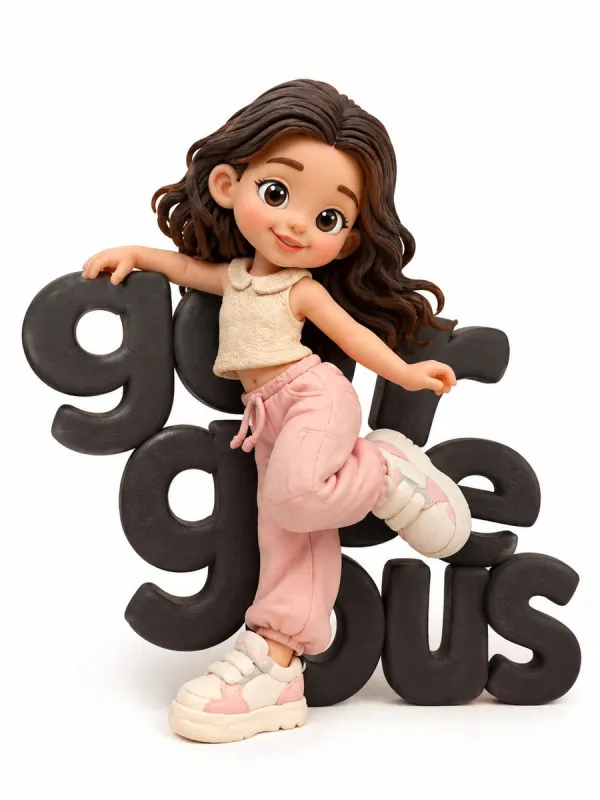
Handmade Clay Character in 3D Animation Style: Joyful Dance Pose Against White Background
Prompt: A cute character made by hand from clay, made in the style of 3D animation. The character stands against a white background; large black letters with the inscription “ handsome are visible behind him. The character has large sneakers, simplified facial features, a joyful expression, and rounded body shapes. The character is depicted in a dynamic dancing pose, as if he is moving to the rhythm of the music and interacting with the letters behind him, slightly leaning on them with his hand and foot. The texture of the clay is soft and matte; small handmade defects are visible. The colors are bright, in a pastel style. The composition is simple, studio lighting, soft shadows. The details are worked out very precisely. The character design meets the standards of high-quality toys. The style is reminiscent of Pixar animation, but the character is handmade from clay. The image resolution is high.
Try this prompt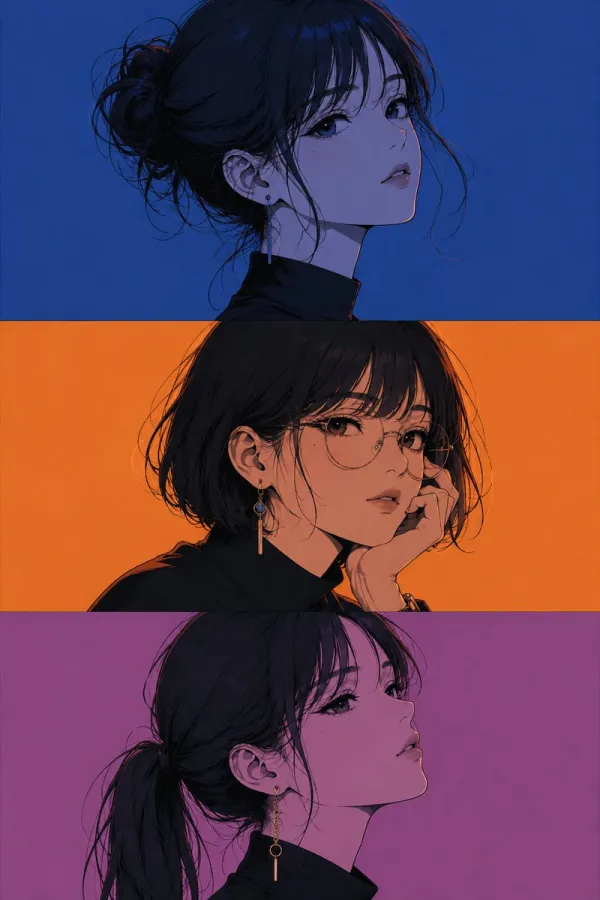
Three-Panel Anime Girl Portrait: Same Face, Different Hairstyles and Glasses
Prompt: Three-panel anime/manga portrait of the same girl with an identical face in every panel. Only the hairstyle, glasses, pose, expression, and accessories change. Vertical triptych, close-up bust portraits, bold clean line art, soft cel shading, minimal details, monochrome color themes with flat solid backgrounds, subtle color reflections, elegant earrings, modern Japanese illustration, aesthetic poster design, high contrast, sharp features, premium editorial style, ultra-detailed, 4K, masterpiece.
Try this prompt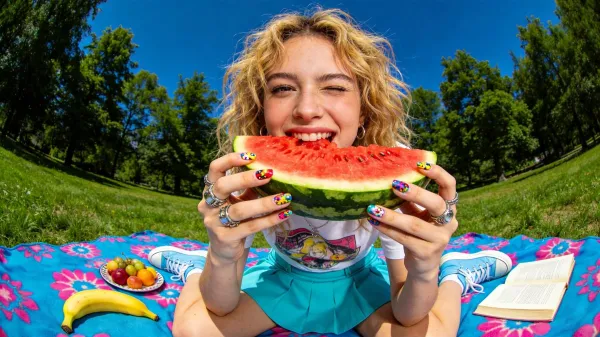
Fisheye Summer Picnic: A Blonde Girl Joyfully Bites Watermelon in the Park
Prompt: A close-up, ultra-wide-angle fisheye lens photograph of a cheerful young woman with messy blonde wavy hair sitting on a brightly colored blue and pink patterned picnic blanket in the middle of a lush green park. She is playfully winking while holding a large, thick wedge of watermelon up to her mouth, biting into the bright red fruit. Her fingers feature colorful nail art and chunky silver rings. She is wearing a vintage white graphic tee, a vibrant turquoise skirt, and retro light blue sneakers. Around her on the blanket are a banana, a small plate of fruit, and an open book. The background features tall green trees under a deep blue, sunny summer sky. The lighting is bright and direct, casting soft shadows, creating a high-energy, casual, and nostalgic summer vibe.
Try this prompt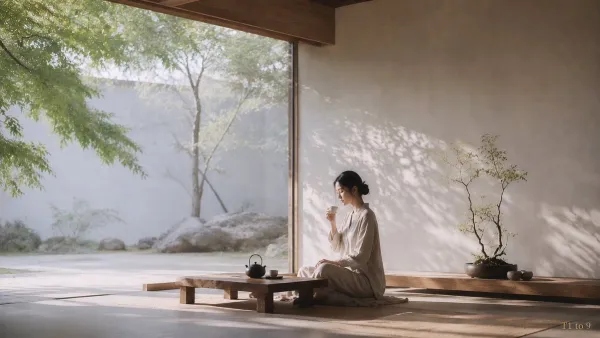
Stillness & Zen: Ambient Portrait of an East Asian Woman in a Minimalist Space
Prompt: 高级时装大片禅意环境人像,东亚成年美丽女性,主题「静·禅」。真实摄影主体 + 极简禅意室内空间 + 大面积负空间(留白)。画面不依靠夸张的表情,而是通过安静的室内空间、自然光线、茶席、窗外庭院与克制留白,来承载平静、放下、内观、安住的情绪。整体呈现美术馆级的精细艺术大片摄影质感,无文字,无标题,无标志,无水印。 【核心场景】 一间极简的禅意室内空间。木质结构、素色灰米色墙面、低矮的木质茶桌、榻榻米或自然地面材质、开阔的落地窗或大开口窗景。窗外是安静的庭院景观:树木、浅色围墙、石头、少量自然植物,整体极简、空寂、干净、平和。窗外景色必须安静地向后退去,不喧宾夺主,只作为“气息”的延伸。 【主体】 一位成年东亚女性,24–30 岁,安静、克制、温柔、内敛。拥有真实自然的骨相,清秀但成熟,不幼态,拒绝网红脸,拒绝动漫脸。展现真实的皮肤纹理、细微毛孔、面部绒毛、自然肤色,以及皮下脂肪的自然透光感,保留真实的面部体量与光学质感。神情平静放松,轻微垂眸,呼吸绵长,双唇自然微合,不悲伤、不冷漠、不谄媚。 【动作】 人物静坐于茶席旁,姿态沉稳、重心稳定,动作极其轻柔缓慢,正在安静地举杯品茶。并非带有表演感的茶艺展示,而是自然、放松、安住于当下的日常禅意瞬间。动势克制,节奏缓慢,仿佛时间在此刻暂停。 【服装与造型】 身着素色米白、燕麦色或浅灰米色的棉麻/亚麻质感宽松衣袍,属于现代极简禅意服饰。布料天然、柔软,具有真实的织物纹理。发型干净安静,低挽的发髻或自然束发,有少量自然碎发但整体柔顺克制。妆容极淡,呈现干净的纯天然原生美感。 【空间道具】 低矮的木质茶桌上仅摆放极简茶具:一只小茶壶与一只茶杯,数量极度克制。室内一侧放置一盆盆景,作为画面中唯一具有强存在感的禅意器物之一。器物造型极简、干净、安静,不堆砌,不繁复。整个空间只保留少量必要元素,绝不杂乱。 【光线氛围】 柔和漫反射自然光,单一自然光源从大窗侧面柔和地照入。整体呈现低对比度,明亮区域柔和而通透,暗部极淡,阴影边缘羽化柔和,墙面上隐约可见轻微的树影投射。带有非常轻微的环境微雾感、微妙的边缘高光晕染以及有机的胶片颗粒感,空气干净通透,具有清晨宁静光线的氛围感。绝不使用强烈的戏剧化光线,绝不高反差。 【构图美学】 16:9 超宽幅环境大片构图。镜头大幅度后退,机位保持带有敬意的观察距离。主体位于画面右侧偏下方,人物仅占画面约 15% 至 20% 的面积,环境与留白主导整个画面。左侧为大面积的窗景与留白空间,右侧为人物与盆景,形成不对称但视觉平衡的禅意构图。环境远大于人物,人物仅作为情绪尺度的锚点。绝不拍摄近景,绝不拍摄半身特写,绝不进行紧凑裁切。 【氛围】 安宁、空寂、释然、内观、清晨般的平静。空间与人共同构成一种安静的禅意居家生活哲学:室内极简,窗外有树、有石、有自然静景,室内外的气息相互连通,整体宛如一幅可居住的禅意生活画面。这不是商业家居广告,也不是普通的摆拍写真,而是高级、安静的时装大片禅意人像。 【画质与质感】 高分辨率原片大片摄影,具备真实的透视纵深感与自然的光学镜头渲染,展现真实的镜头空间感。脸部、眼睛、茶具与盆景清晰真实,远处的背景与大面积留白区域柔和干净,不破碎、不脏乱、不虚假。带有轻微的胶片颗粒,细节克制,整体呈现高级、安静、通透的质感。 【负面约束】 拒绝计算机图形(CG),拒绝3D渲染,拒绝虚幻引擎质感,拒绝动漫脸,拒绝塑料感皮肤,拒绝蜡感磨皮,拒绝过度锐化,拒绝杂乱的装饰,拒绝多余的道具,拒绝拥挤的茶具,拒绝夸张的姿势,拒绝戏剧化的表情,拒绝强烈的对比度,拒绝杂乱的背景,无文字,无水印。
Try this prompt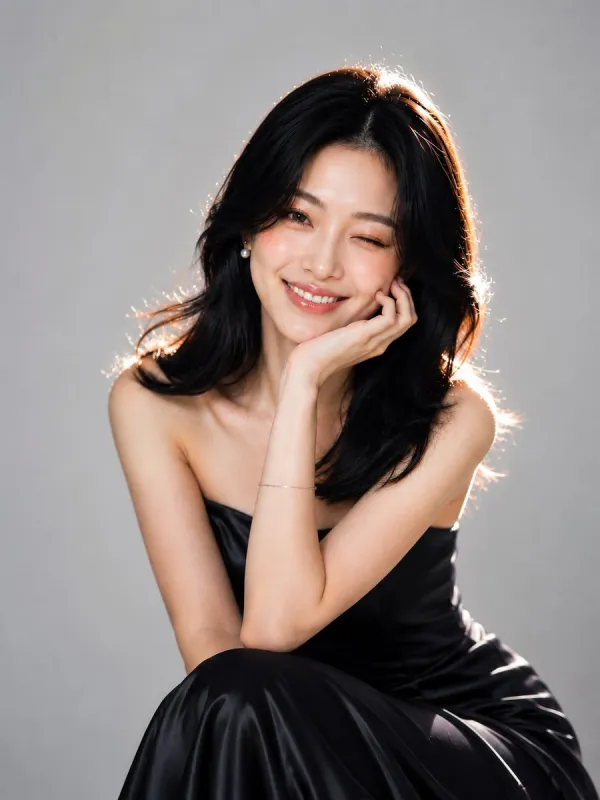
Midnight Navy Satin Gown Portrait: Elegance of Pearl Earrings and Silver Bracelet
Prompt: Ultra-realistic high-end studio beauty portrait of a beautiful young East Asian woman with shoulder-length silky black hair styled in soft layers, wearing elegant pearl stud earrings, a delicate silver bracelet, and a luxurious strapless midnight navy satin gown with a subtle sheen. She is seated in a relaxed pose, leaning slightly forward with one elbow resting on her knee, her chin gently supported by her hand. She smiles warmly at the camera with one eye playfully winking, creating a natural, charming, and approachable expression. Her skin is flawless, luminous, and porcelain-smooth with a soft natural glow, light peach blush, subtle champagne highlighter, softly defined brows, warm brown eyes, long curled eyelashes, and glossy rosy-pink lips. Gentle dimples become visible as she smiles. The portrait is captured against a seamless pastel sky-blue studio background with strong separation from the subject. Bright soft key lighting is placed slightly to the front, while a warm rim light from behind creates a glowing halo around her hair and shoulders, emphasizing depth and elegance. The satin fabric reflects soft highlights with realistic folds and texture. The composition is centered with the subject filling most of the vertical frame, shallow depth of field, creamy background bokeh, razor-sharp facial details, realistic skin texture, premium editorial fashion photography, luxury cosmetics campaign aesthetic, clean minimalist styling, natural color grading, ultra-detailed, photorealistic, HDR, 8K resolution, medium telephoto lens (85mm), f/1.8, professional studio photography, magazine cover quality, timeless elegance, sophisticated yet playful mood, vertical 3:4 aspect ratio.
Try this prompt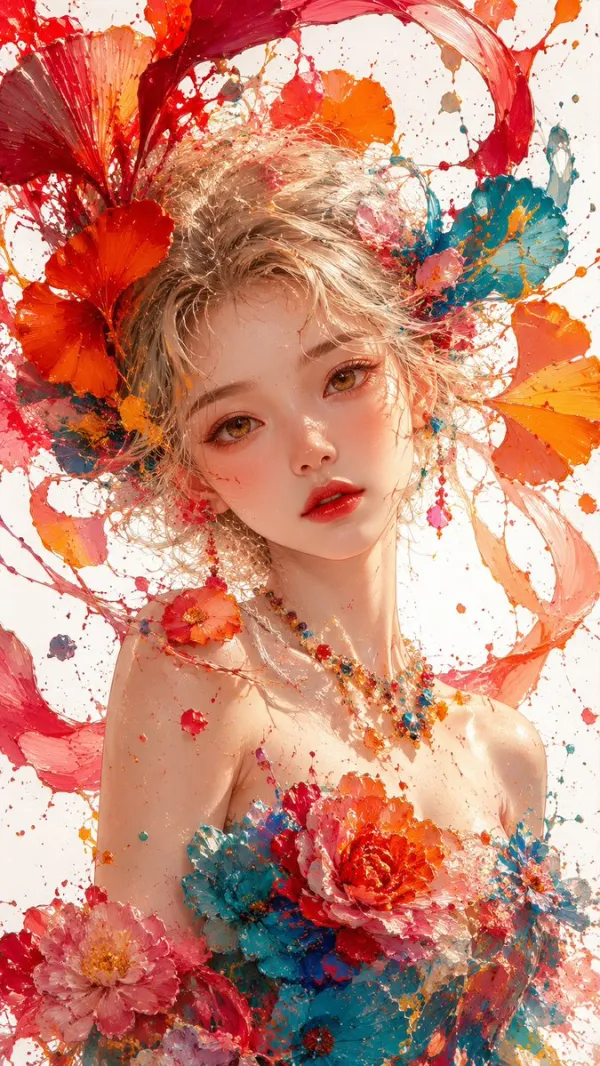
Impasto Oil Painting Portrait: Fiery Hair and Giant Ginkgo Petals Surrounding a Young Girl
Prompt: Masterpiece, best quality, 8K ultra detailed, thick impasto oil painting, splashing paint texture, close-up bust portrait of a beautiful young East Asian girl, soft fluffy pale blonde messy curly hair, hair blended with flowing fiery red orange paint ribbons and giant ginkgo flowers, huge vibrant red, cyan, magenta, orange petals surrounding her head, warm amber gentle eyes, soft peach blush, glossy red lips, fair luminous dewy skin, strapless floral gown with thick paint texture, dress decorated with layered peony flowers, colorful gem bead necklace, countless splashed red orange teal paint splatters floating around, pure clean white background, soft bright diffused studio lighting, glowing warm rim light, vivid saturated candy bold color palette, dreamy romantic floral fairy atmosphere, transparent flowing paint petal particles, sharp facial details, cinematic soft glow, painterly brush strokes --ar 9:16 --style raw --v 6.0
Try this promptAvailable controls
These values come from the controls currently available in the Pixocto workbench.
- Workflows
- Text-to-image and reference-guided image generation
- Reference images
- 6
- Aspect ratios
- 1:1 · 2:3 · 3:2 · 3:4 · 4:3 · 9:16 · 16:9 · 21:9 · 9:21
- Output resolutions
- 1K · 2K · 4K
- Quality controls
- low · medium · high
- Background
- auto · transparent · opaque
- Credits at default settings
- 1K: 50 · 2K: 120 · 4K: 200
